kubriX on a local KinD cluster
Prerequisites
- check Prerequisites
Installation steps
-
Create a dedicated organization (GitHub) or group (GitLab) for your kubriX repositories.
warningDo not create repositories under a personal GitHub account or in a personal GitLab namespace. kubriX uses the Argo CD
ApplicationSetSCM provider generator, which does not support personal accounts/namespaces. -
create new empty customer repo on your Git-Server (GitLab, GitHub, Gitea, ...).
We fully tested this with GitHub, but others should also work.
warningIMPORTANT: the repo needs to be empty (also no initial README!!!)
-
create an access token for this new repo with write access
Instead of a newly created access token you can also use your personal access tokens, but this is not recommended since your personal access token has probably more permissions than needed.
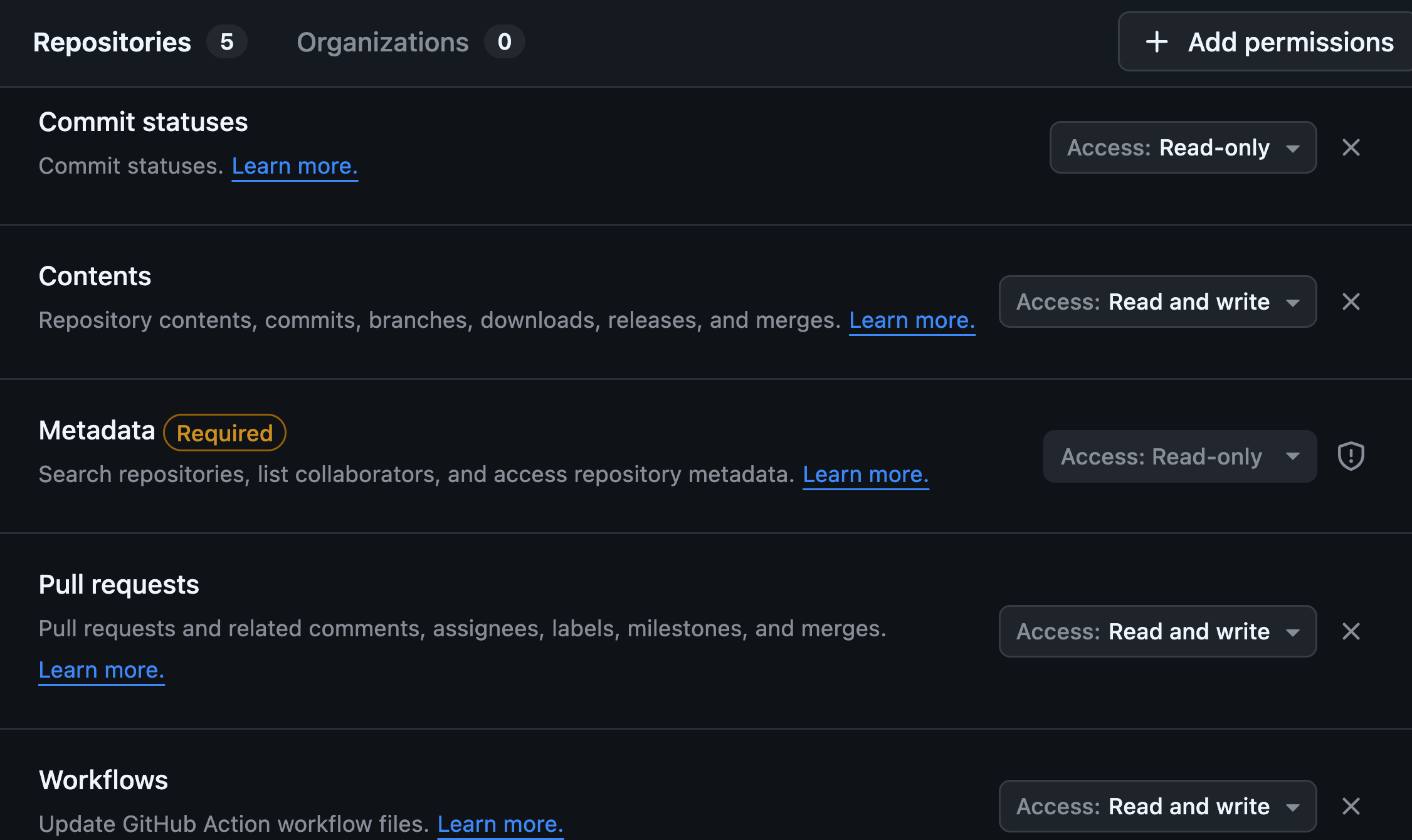
-
create a new KinD cluster. You need to enable ingress on your KinD cluster so this command below should be used:
kind create cluster --name kubrix-local-demo --config /dev/stdin <<EOF
kind: Cluster
apiVersion: kind.x-k8s.io/v1alpha4
nodes:
- role: control-plane
  kubeadmConfigPatches:
  - |
    kind: InitConfiguration
    nodeRegistration:
      kubeletExtraArgs:
        node-labels: "ingress-ready=true"
  extraPortMappings:
  - containerPort: 80
    hostPort: 80
    protocol: TCP
  - containerPort: 443
    hostPort: 443
    protocol: TCP
EOF
Then be sure that kubectl is connected to it.
tipCheck with
kubectl cluster-info -
Create a
kubrix-installNamespace and a Secretkubrix-installer-secretsto configure the installer.The values of
KUBRIX_REPOandKUBRIX_REPO_PASSWORDneed to be set to your newly created empty Git repo in step 2 and the access token you created in step 3.tipSummary of all possible configuration options via the
kubrix-installer-secretsin Install Secrets Reference.export KUBRIX_REPO="https://github.com/kubriX-demo/kubriX-demo-customerXY"
export KUBRIX_REPO_PASSWORD="your-read-write-access-token"
export KUBRIX_GIT_USER_NAME="your-github-username"
kubectl create ns kubrix-install
kubectl create secret generic kubrix-install-secrets -n kubrix-install \
--from-literal KUBRIX_REPO=${KUBRIX_REPO} \
--from-literal KUBRIX_REPO_PASSWORD=${KUBRIX_REPO_PASSWORD} \
--from-literal KUBRIX_GIT_USER_NAME=${KUBRIX_GIT_USER_NAME} \
--from-literal KUBRIX_DOMAIN="127-0-0-1.nip.io" \
--from-literal KUBRIX_DNS_PROVIDER="none" \
--from-literal KUBRIX_TARGET_TYPE="kubrix-oss-stack" \
--from-literal KUBRIX_CLUSTER_TYPE="kind" \
--from-literal KUBRIX_BOOTSTRAP=true \
--from-literal KUBRIX_INSTALLER=true -
Then apply the installer manifests:
kubectl apply -f https://raw.githubusercontent.com/suxess-it/kubriX/refs/heads/main/install-manifests.yamlThese manifests will create a Kubernetes Job which creates a clone of the upstream kubriX OSS repo with some customizations in your newly created repo and starts the installation on your local KinD cluster.
infoThis could take up to 30 minutes, depending how powerful your local environment is.
Especially Keycloak could take a while, since there are many resources created via Crossplane in different ArgoCD sync-waves. After 300 seconds the sync process gets terminated and restarted. This could happend sometimes and is not always indicating a problem. Also, sometimes the Keycloak app could be in temporary
Degradedstate during installation, but getsHealthyafterwards.tipYou can watch the logs of the job with
kubectl logs -n kubrix-install -f "pod/$(kubectl get pod -n kubrix-install -l "job-name=kubrix-install-job" -o jsonpath='{.items[0].metadata.name}')" --all-containers=true
Next steps
- Post-Installation steps
- Configuration Guide – customize kubriX for your needs
- User Guide – start deploying apps