Sign-In Providers
Overview how dynamic authentication provider selection works in Backstage on our platform, and how users can configure available login options.
High-Level Overview
Backstage supports multiple authentication providers such as GitHub, GitLab, and OIDC (Keycloak). In kubriX we provide:
- OIDC / Keycloak is always enabled as the base identity provider.
- Additional providers (GitHub, GitLab) can be enabled or disabled dynamically through configuration.
The platform reads the configured providers at runtime and only shows those on the Backstage login screen.
Configuration can be fully controlled by the user via *app-config.yaml in the Backstage Helm chart.
Configuring Sign-In Providers
To configure which login buttons appear in the Backstage sign-in page, use the following section in your *values*.yaml:
Example
appConfig:
  kubrix:
    auth:
      allowedProviders:
        - github
        # and/or
        - gitlab
Supported values:
githubgitlab
OIDC / Keycloak is always active.
Backend Requirements
For each provider you enable in allowedProviders, the Backstage backend must have a matching authentication configuration:
- GitHub: requires
auth.providers.github - GitLab: requires
auth.providers.gitlab - OIDC / Keycloak: already configured on the platform
If a provider is enabled in allowedProviders but not configured in the backend, the login button appears but authentication will fail.
Known Behaviour
- OIDC provider is always present and cannot be disabled.
- If no providers are configured, only OIDC will be shown, and backstage logs:
No kubrix.auth.allowedProviders configured. Only OIDC will be shown.
- Unsupported provider values are ignored but logged in the browser console:
Unknown sign-in providers in kubrix.auth.allowedProviders: bitbucket.
Supported: github, gitlab
- If the configuration block is missing, Backstage falls back to OIDC only.
- The feature is modular and ready for extension (e.g. Azure AD, Google Auth) in future versions.
Keycloak User Provisioning
Backstage resolves a logged-in user's identity against the software catalog. When a brand new Keycloak user logs in for the first time, their User entity may not yet exist in the catalog - the Keycloak catalog sync runs on a schedule and may not have run since the user was created.
Without any fallback, this would cause the login to fail entirely.
Opt-In Sign-In Resolver
The kubriX provisioning flow is opt-in via a custom named resolver: kubriXMatchingUserEntityProfileEmail. It is configured alongside the standard Backstage OIDC resolvers and can be switched at any time in *values*.yaml.
The resolver uses a two-step approach:
- Try catalog lookup - match the logged-in user's email against
spec.profile.emailon existingUserentities. - Fallback - if no entity is found, issue a temporary token under the
user:unprovisioned/namespace instead of failing.
User logs in via Keycloak
        │
        ▼
Catalog lookup by email
        │
   ┌────┴────┐
Found?       Not found?
   │              │
   ▼              ▼
Normal login   Issue unprovisioned token
user:default/  user:unprovisioned/<username>
Enabling the kubriX Provisioning Flow
In your *values*.yaml, set the resolver to kubriXMatchingUserEntityProfileEmail:
appConfig:
  auth:
    providers:
      oidc:
        development:
          signIn:
            resolvers:
              - resolver: kubriXMatchingUserEntityProfileEmail
Using the Default Backstage Behavior
To disable the kubriX provisioning flow and use standard Backstage resolvers instead:
appConfig:
  auth:
    providers:
      oidc:
        development:
          signIn:
            resolvers:
              - resolver: emailLocalPartMatchingUserEntityName
              - resolver: emailMatchingUserEntityProfileEmail
With the default resolvers, login will fail if the user does not yet exist in the catalog. No provisioning dialog will be shown.
The Unprovisioned Namespace
Users who log in before being synced to the catalog receive an identity in the user:unprovisioned/ namespace:
user:unprovisioned/<email-local-part>
This namespace is intentionally separate from user:default/ so that RBAC policies can restrict unprovisioned users to limited access only.
You can use the RBAC backend to define a role for user:unprovisioned/* with minimal permissions while they wait for their catalog entity to be created.
First Login Flow
1. User logs in via Keycloak OIDC
2. No catalog entity found → token issued as user:unprovisioned/<username>
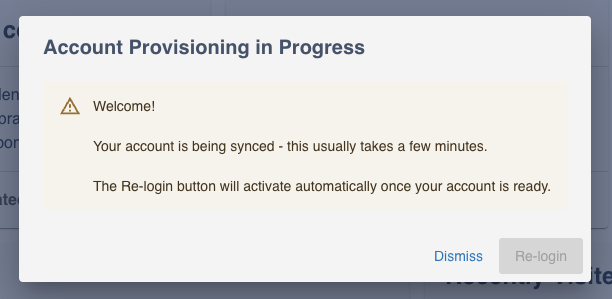
3. Frontend detects unprovisioned namespace → shows "Account Provisioning in Progress" dialog
4. Keycloak catalog sync runs (scheduled, configurable)
5. User entity created in catalog as user:default/<username>
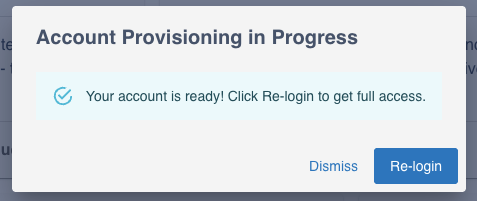
6. Frontend polls catalog every 10s → detects entity creation → dialog switches to success state
7. Re-login button activates → user clicks it → signed out and redirected to login page
8. Second login → catalog lookup succeeds → full identity resolved
Frontend Provisioning Dialog
When a user logs in with an unprovisioned identity, a centered dialog titled "Account Provisioning in Progress" is shown automatically.
While waiting for sync:
Once the catalog entity is detected:
The dialog offers two actions:
- Dismiss - close the dialog and continue with limited access
- Re-login - disabled until provisioning is complete, then signs the user out and redirects to the login page
The dialog checks the catalog immediately on open, then every 10 seconds. Once the user:default/<username> entity appears, it automatically switches to the success state and activates the Re-login button - no manual refresh needed.
Catalog Sync Schedule
The time a user waits depends on the Keycloak catalog sync frequency. The default is 30 minutes. You can shorten this in your *values*.yaml:
appConfig:
  catalog:
    providers:
      keycloakOrg:
        default:
          schedule:
            frequency:
              minutes: 5
            timeout:
              minutes: 3
For a better first-login experience, set the frequency to 5 minutes. Avoid values below 2 minutes for large Keycloak realms as the sync may not complete before the next run starts.
Summary
| State | Identity | Access | Dialog shown |
|---|---|---|---|
| First login, not yet synced | user:unprovisioned/<name> | Limited (RBAC) | Yes |
| After sync, re-login | user:default/<name> | Full Granted (RBAC) | No |