Alerting
kubriX ships default Kubernetes alert rules as Grafana-managed alert rules. These rules are defined in platform-apps/charts/grafana/alerting-rules/kubernetes-alerts.yaml and apply to all applications.
Alert delivery is configured through Grafana contact points and notification policies. The root policy sends alerts to the platform team by default, and you can add more specific routes for teams and severities such as warning and critical.
The required Mimir datasource-managed recording rules include equivalents of the Grafana cloud recording rules. The Grafana-managed alerting rules correspond to the Grafana cloud alerting rules.
The alerts are automatically enabled by default in values-kubrix-default.yaml with these settings:
kubernetesAlerts:
  enabled: true
You can extend these alert rules by creating your own ConfigMaps in the grafana/templates directory. (Please contact kubriX support for details!)
Alert routing model
The high-level data flow diagram looks like this:
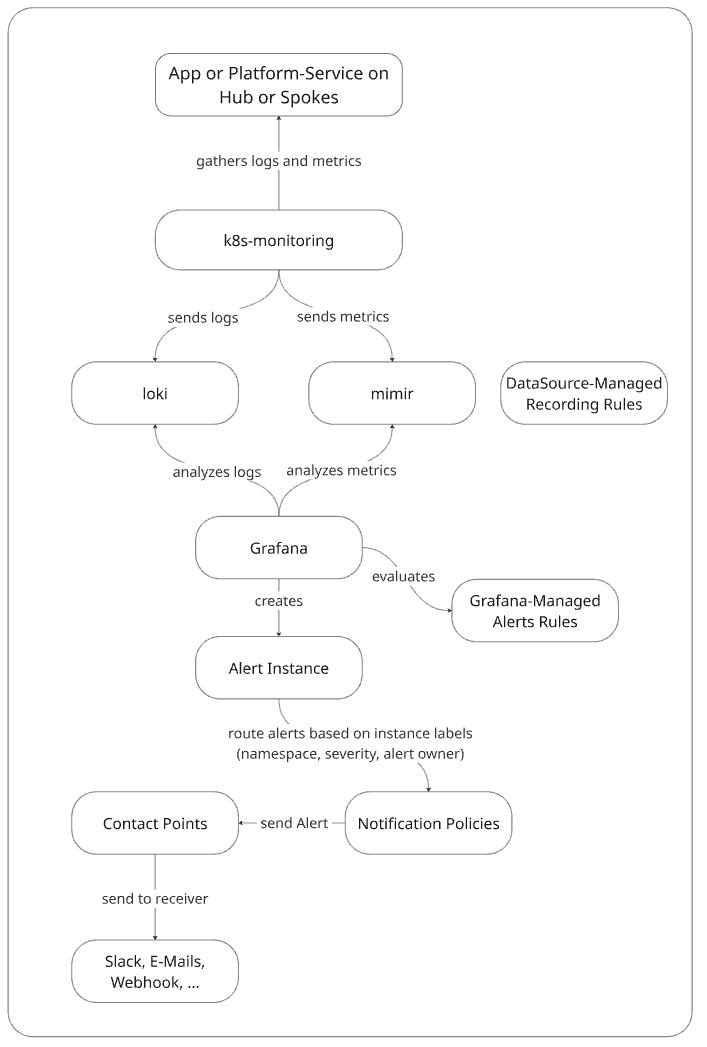
kubriX now separates alerting into two concepts:
- Contact points define where notifications are sent.
- Notification policies define which alerts are sent to which contact points.
Platform team alerting
The platform team contact point is the default receiver for alerts. All alerts that do not match a team-specific namespace route are sent to the platform team. If a team does not define its own alerting configuration, its alerts also fall back to the platform team receiver.
The platform team should define a default receiver. Optional additional contact points can be added for special routes such as warning and critical.
You can configure the contact point in the kubriX team-onboarding customer values file in the platformteam attribute like this:
platformteam:
  alerting:
    defaultReceiver: platform-team-default
    groupBy:
      - grafana_folder
      - alertname
      - namespace
      - severity
    contactPoints:
      platform-team-default:
        receivers:
          - uid: platform-team-default
            type: webhook
            settings:
              url: http://matrix-alertmanager-receiver:3000/alerts/!platform-default:example.org
            disableResolveMessage: false

      platform-team-warning:
        receivers:
          - uid: platform-team-warning
            type: webhook
            settings:
              url: http://matrix-alertmanager-receiver:3000/alerts/!platform-warning:example.org
            disableResolveMessage: false

      platform-team-critical:
        receivers:
          - uid: platform-team-critical
            type: webhook
            settings:
              url: http://matrix-alertmanager-receiver:3000/alerts/!platform-critical:example.org
            disableResolveMessage: false

    notificationPolicy:
      - receiver: platform-team-warning
        object_matchers:
          - ["severity", "=", "warning"]

      - receiver: platform-team-critical
        object_matchers:
          - ["severity", "=", "critical"]
The notificationPolicy section is optional. If it is omitted, all alerts handled by this scope are sent to the defaultReceiver.
Team-specific alerting
Each team can optionally define its own alerting configuration in team-onboarding values file. If no team-specific alerting is configured, alerts fall back to the platform default receiver.
When a team does define alerting, kubriX creates a namespace-based routing branch using the convention:
<team-name>-.*
That means a team called my-awesome-team matches alerts whose namespace label matches my-awesome-team-.*. This team branch can define its own default receiver and nested severity routes.
The contact points for each team are defined in the team-onboarding values under the alerting attribute.
Example:
teams:
  - name: my-awesome-team
    alerting:
      defaultReceiver: my-awesome-team-default
      groupBy:
        - grafana_folder
        - alertname
        - namespace
      contactPoints:
        my-awesome-team-default:
          receivers:
            - uid: my-awesome-team-default
              type: webhook
              settings:
                url: http://matrix-alertmanager-receiver:3000/alerts/!my-awesome-team-default:example.org
              disableResolveMessage: false

        my-awesome-team-warning:
          receivers:
            - uid: my-awesome-team-warning
              type: webhook
              settings:
                url: http://matrix-alertmanager-receiver:3000/alerts/!my-awesome-team-warning:example.org
              disableResolveMessage: false

        my-awesome-team-critical:
          receivers:
            - uid: my-awesome-team-critical
              type: webhook
              settings:
                url: http://matrix-alertmanager-receiver:3000/alerts/!my-awesome-team-critical:example.org
              disableResolveMessage: false

      notificationPolicy:
        - receiver: my-awesome-team-warning
          object_matchers:
            - ["severity", "=", "warning"]

        - receiver: my-awesome-team-critical
          object_matchers:
            - ["severity", "=", "critical"]
A team-specific notificationPolicy is optional. If it is omitted, all alerts in that team namespace are sent to the team's defaultReceiver.
Resulting routing behavior
With the configuration above, routing works like this:
- Alerts from namespaces that do not belong to a team-specific branch go to
platform-team-default. - Alerts with
severity=warningcan be routed toplatform-team-warning. - Alerts with
severity=criticalcan be routed toplatform-team-critical. - Alerts from a team namespace such as
my-awesome-team-*first enter themy-awesome-teambranch. - Inside that team branch, alerts can be routed again by severity, for example to
my-awesome-team-warningormy-awesome-team-critical.
Multiple receivers in one contact point
A contact point can contain one or more receivers. This is useful when the same alert should be delivered to multiple destinations, for example a chat room and PagerDuty.
Example:
platformteam:
  alerting:
    contactPoints:
      platform-team-critical:
        receivers:
          - uid: platform-team-critical-chat
            type: webhook
            settings:
              url: http://matrix-alertmanager-receiver:3000/alerts/!platform-critical:example.org
            disableResolveMessage: false

          - uid: platform-team-critical-pagerduty
            type: pagerduty
            settings:
              integrationKey: ${PAGERDUTY_INTEGRATION_KEY}
            disableResolveMessage: false
Use multiple receivers in one contact point when the same matched alerts should be sent to multiple destinations. Use notification policies when different alerts should be routed to different contact points.
Minimal configuration
If you only define a platform default receiver and no additional routes, kubriX still renders a valid root notification policy with that receiver and the configured group_by labels. So all alerts from all namespaces get routed to the platform-team-default contact point.
platformteam:
  alerting:
    defaultReceiver: platform-team-default
    groupBy:
      - grafana_folder
      - alertname
      - namespace
      - severity
    contactPoints:
      platform-team-default:
        receivers:
          - uid: platform-team-default
            type: webhook
            settings:
              url: http://matrix-alertmanager-receiver:3000/alerts/!platform-default:example.org
            disableResolveMessage: false
OpenBao Integration
If you want to store contact point data in OpenBao instead of placing it in your Git repository,
you can create secrets in your kubrix-kv/<team-name>/observability path.
Each key in this secret is exposed to Grafana as an environment variable through an ExternalSecret.
To avoid collisions with environment variables from other teams or from Grafana itself, each key is prefixed with KUBRIX_<TEAM_NAME>, where - characters in the team name are replaced with _.
Example:
Create a key MSTEAMS_WEBHOOK in the kubrix-kv/my-awesome-team/observability path and as the value your alerting webhook URL:
MSTEAMS_WEBHOOK: https://prod-123.westeurope.logic.azure.com:443/workflows/abc123-my-personal-webhook
In your team-onboarding values section you can use the variable KUBRIX_MY_AWESOME_TEAM_MSTEAMS_WEBHOOK as the webhook url:
  - name: my-awesome-team
    alerting:
      defaultReceiver: my-awesome-team-default
      contactPoints:
        my-awesome-team-default:
          receivers:
            - uid: my-awesome-team
              type: teams
              settings:
                url: ${KUBRIX_MY_AWESOME_TEAM_MSTEAMS_WEBHOOK}
              disableResolveMessage: false