Observability
In this document we give an overview how observability in our platform works, its main components and how to configure the observability stack.
High-Level Overview
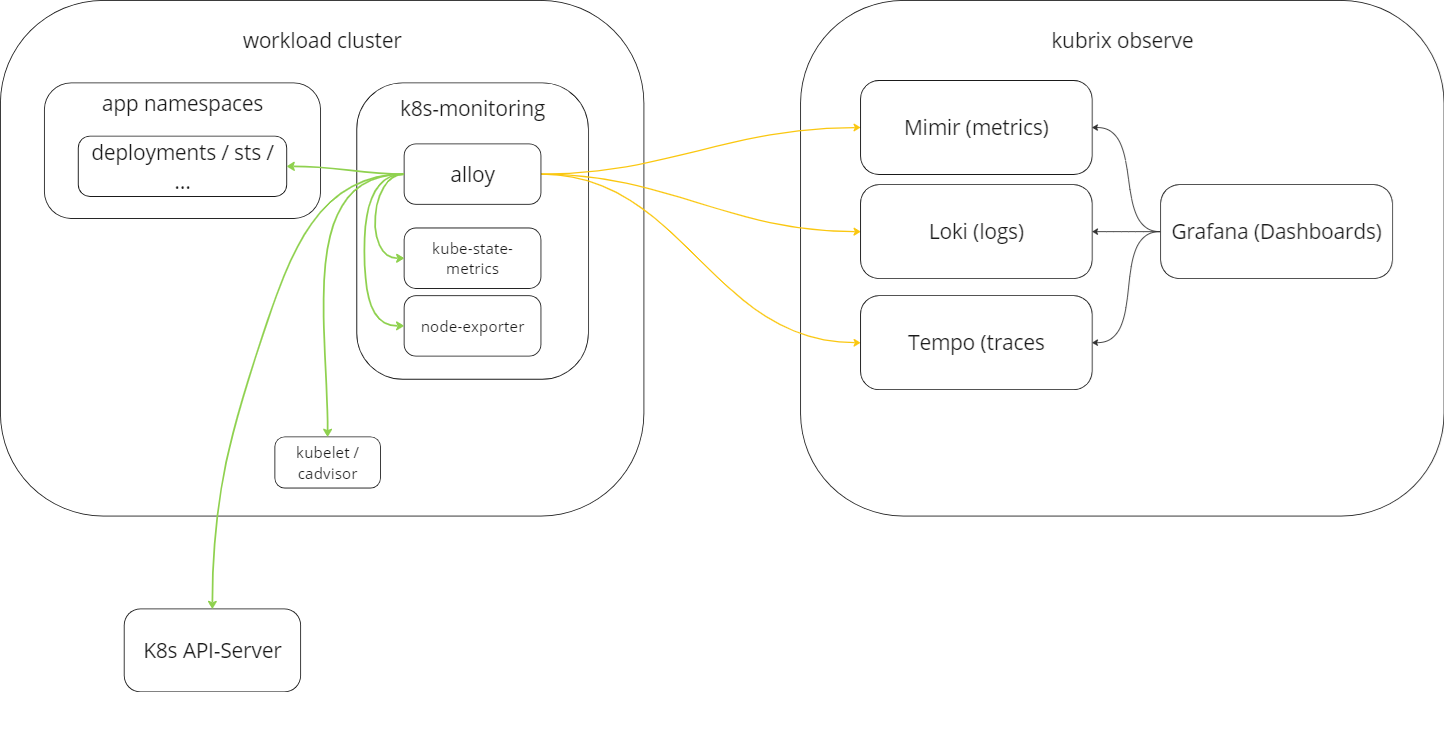
Via k8s-monitoring helm-chart Grafana Alloy and some additional prometheus exporter (kube-state-metrics, node-exporter) are installed on the workload cluster to scrape important metrics, gather logs from pods and receive otel traces from applications.
A more detailed structure of this chart is available in https://github.com/grafana/k8s-monitoring-helm/blob/main/charts/k8s-monitoring/docs/Structure .
Alloy pushes the metrics to Mimir, logs to Loki and traces to Tempo. Grafana displays those informations in the corresponding dashboards.
Customizing Metrics
k8s-monitoring helm charts get shipped with some default metrics
You can customize them in the metrics section of the values file and do also other customizations.
Application specific metrics can be scraped via Prometheus Operator CRDs or Annotations on your target pods, like described in Scraping Additional Metrics.