Alerting
kubriX ships default Kubernetes alert rules as Grafana-managed alert rules. These rules are defined in:
platform-apps/charts/grafana/alerting-rules/kubernetes-alerts.yaml
and apply to all applications running on the platform.
The required Mimir datasource-managed recording rules include equivalents of the Grafana Cloud recording rules.
The Grafana-managed alerting rules correspond to the Grafana Cloud alerting rules.
The alerts are automatically enabled by default in values-kubrix-default.yaml:
kubernetesAlerts:
  enabled: true
You can extend these alert rules by creating your own ConfigMaps in the grafana/templates directory.
Please contact kubriX support for details about extending Grafana-managed alert rules.
Alert routing model
kubriX separates alerting into two concepts:
- Contact points define where notifications are sent.
- Notification policies define which alerts are sent to which contact points.
The high-level data flow looks like this:
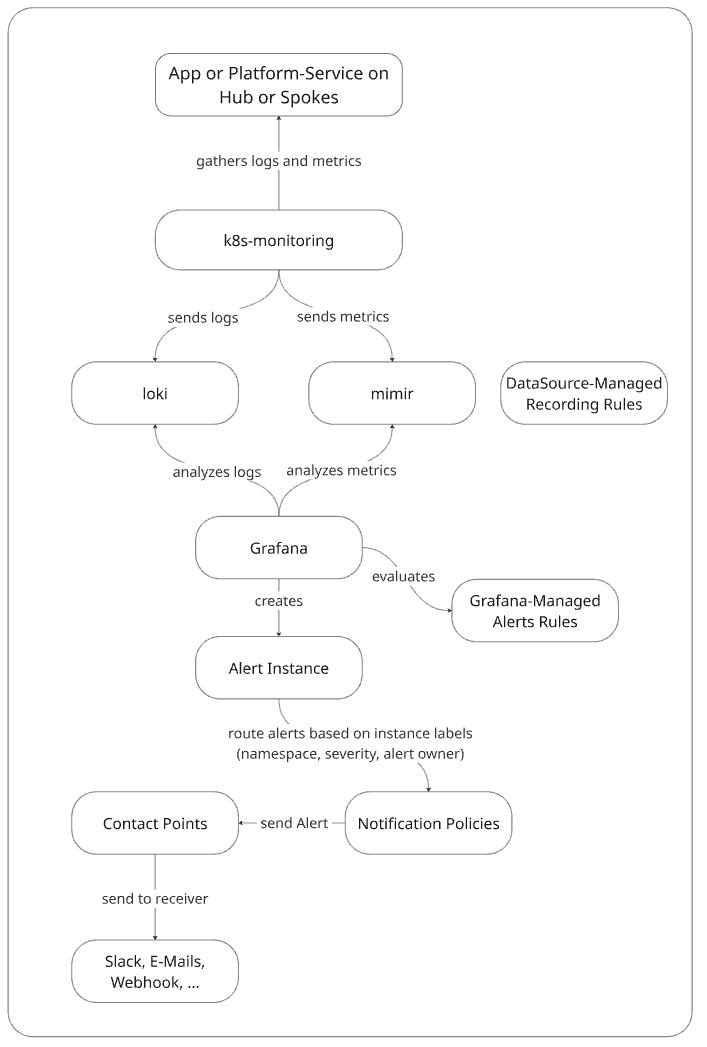
kubriX uses Grafana's notification policy tree to dynamically route alerts based on labels such as:
namespaceseverityjob- custom labels
For more details about Grafana notification policies see:
- https://grafana.com/docs/grafana/latest/alerting/fundamentals/notifications/notification-policies/
- https://grafana.com/docs/grafana/latest/alerting/configure-notifications/create-notification-policy/
Recommended routing architecture
kubriX recommends routing alerts dynamically via labels and notification policies instead of assigning contact points directly in alert rules.
Recommended flow:
Alert Rule
    ↓
Labels
    ↓
Notification Policy
    ↓
Contact Point
Example labels:
labels:
  severity: critical
  job: sonic-exporter
Example notification policy:
notificationPolicy:
  - receiver: sonic-critical
    object_matchers:
      - ["job", "=", "sonic-exporter"]
      - ["severity", "=", "critical"]
Advantages of this model:
- centralized routing logic
- reusable alert rules
- easier GitOps integration
- cleaner separation of concerns
- less manual Grafana configuration
- scalable team onboarding
Label matching behavior
Notification policies use Grafana label matchers.
Example:
object_matchers:
  - ["severity", "=", "critical"]
  - ["job", "=", "sonic-exporter"]
Multiple matchers are combined using the logical AND operator.
That means:
severity=critical AND job=sonic-exporter
must both match for the route to apply.
Supported matcher operators include:
| Operator | Meaning |
|---|---|
= | equals |
!= | not equals |
=~ | regex match |
!~ | regex does not match |
For details see:
https://grafana.com/docs/grafana/latest/alerting/fundamentals/notifications/notification-policies/
Platform team alerting
The platform team contact point is the default receiver for alerts.
All alerts that do not match a team-specific namespace route are sent to the platform team.
If a team does not define its own alerting configuration, alerts also fall back to the platform team receiver.
The platform team should define:
- a default receiver
- optional severity-specific routes such as
warningandcritical
Example:
platformteam:
  alerting:
    defaultReceiver: platform-team-default

    groupBy:
      - grafana_folder
      - alertname
      - namespace
      - severity

    contactPoints:
      platform-team-default:
        receivers:
          - uid: platform-team-default
            type: webhook
            settings:
              url: http://matrix-alertmanager-receiver:3000/alerts/!platform-default:example.org
            disableResolveMessage: false

      platform-team-warning:
        receivers:
          - uid: platform-team-warning
            type: webhook
            settings:
              url: http://matrix-alertmanager-receiver:3000/alerts/!platform-warning:example.org
            disableResolveMessage: false

      platform-team-critical:
        receivers:
          - uid: platform-team-critical
            type: webhook
            settings:
              url: http://matrix-alertmanager-receiver:3000/alerts/!platform-critical:example.org
            disableResolveMessage: false

    notificationPolicy:
      - receiver: platform-team-warning
        object_matchers:
          - ["severity", "=", "warning"]

      - receiver: platform-team-critical
        object_matchers:
          - ["severity", "=", "critical"]
If the notificationPolicy section is omitted, all alerts handled by this scope are sent to the defaultReceiver.
Team-specific alerting
Each team can optionally define its own alerting configuration in the team-onboarding values file.
If no team-specific alerting is configured, alerts fall back to the platform default receiver.
Automatic namespace-based routing
When a team defines alerting, kubriX automatically creates a namespace-based routing branch using the matcher:
namespace =~ <team-name>-.*
Example:
namespace =~ my-awesome-team-.*
This matches namespaces such as:
my-awesome-team-prodmy-awesome-team-devmy-awesome-team-monitoring
This means alerts originating from namespaces belonging to a team are automatically routed into the team's notification policy branch.
Example configuration
teams:
  - name: my-awesome-team

    alerting:
      defaultReceiver: my-awesome-team-default

      groupBy:
        - grafana_folder
        - alertname
        - namespace

      contactPoints:
        my-awesome-team-default:
          receivers:
            - uid: my-awesome-team-default
              type: webhook
              settings:
                url: http://matrix-alertmanager-receiver:3000/alerts/!my-awesome-team-default:example.org
              disableResolveMessage: false

        my-awesome-team-warning:
          receivers:
            - uid: my-awesome-team-warning
              type: webhook
              settings:
                url: http://matrix-alertmanager-receiver:3000/alerts/!my-awesome-team-warning:example.org
              disableResolveMessage: false

        my-awesome-team-critical:
          receivers:
            - uid: my-awesome-team-critical
              type: webhook
              settings:
                url: http://matrix-alertmanager-receiver:3000/alerts/!my-awesome-team-critical:example.org
              disableResolveMessage: false

      notificationPolicy:
        - receiver: my-awesome-team-warning
          object_matchers:
            - ["severity", "=", "warning"]

        - receiver: my-awesome-team-critical
          object_matchers:
            - ["severity", "=", "critical"]
A team-specific notificationPolicy is optional.
If it is omitted, all alerts in that team namespace are sent to the team's defaultReceiver.
Resulting routing behavior
With the configuration above:
- Alerts from namespaces that do not belong to a team-specific branch go to
platform-team-default. - Alerts with
severity=warningcan be routed toplatform-team-warning. - Alerts with
severity=criticalcan be routed toplatform-team-critical. - Alerts from namespaces such as
my-awesome-team-*first enter themy-awesome-teamrouting branch. - Inside that branch, alerts can be routed again by labels such as
severityorjob.
Advanced routing examples
Notification policies can also route alerts based on application-specific labels.
Example:
notificationPolicy:
  - receiver: sonic-critical
    object_matchers:
      - ["job", "=", "sonic-exporter"]
      - ["severity", "=", "critical"]

  - receiver: sonic-warning
    object_matchers:
      - ["job", "=", "sonic-exporter"]
      - ["severity", "=", "warning"]
This enables application-specific routing without assigning contact points directly inside alert rules.
Contact points vs notification policies
A common pattern is confusing contact points with notification policies.
Contact points
Contact points define:
WHERE alerts are sent
Examples:
- Matrix
- Microsoft Teams
- PagerDuty
- Slack
- Webhooks
Notification policies
Notification policies define:
WHICH alerts are sent WHERE
kubriX recommends using notification policies for production routing because they:
- centralize routing logic
- scale better
- avoid duplicated alert rules
- simplify GitOps workflows
Multiple receivers in one contact point
A contact point can contain one or more receivers.
This is useful when the same alert should be delivered to multiple destinations.
Example:
platformteam:
  alerting:
    contactPoints:
      platform-team-critical:
        receivers:
          - uid: platform-team-critical-chat
            type: webhook
            settings:
              url: http://matrix-alertmanager-receiver:3000/alerts/!platform-critical:example.org
            disableResolveMessage: false

          - uid: platform-team-critical-pagerduty
            type: pagerduty
            settings:
              integrationKey: ${PAGERDUTY_INTEGRATION_KEY}
            disableResolveMessage: false
Use:
- multiple receivers in one contact point when the same alerts should go to multiple destinations
- notification policies when different alerts should go to different contact points
Troubleshooting alert routing
Grafana provides several ways to inspect and debug alert routing behavior.
Alert history
You can inspect alert history in:
Alerting -> History
You can filter alerts by labels.
Example:
job=sonic-exporter
This helps verify:
- whether alerts fired
- whether labels were attached correctly
- whether notification policies matched as expected
- whether alerts reached the correct contact point
Inspecting routes
You can inspect the rendered notification policy tree in:
Alerting -> Notification policies
This is useful to understand:
- generated namespace routes
- severity routing
- inherited routing behavior
- fallback receivers
For more details see:
https://grafana.com/docs/grafana/latest/alerting/fundamentals/notifications/notification-policies/
Minimal configuration
If you only define a platform default receiver and no additional routes, kubriX still renders a valid root notification policy.
Example:
platformteam:
  alerting:
    defaultReceiver: platform-team-default

    groupBy:
      - grafana_folder
      - alertname
      - namespace
      - severity

    contactPoints:
      platform-team-default:
        receivers:
          - uid: platform-team-default
            type: webhook
            settings:
              url: http://matrix-alertmanager-receiver:3000/alerts/!platform-default:example.org
            disableResolveMessage: false
In this setup:
- all alerts from all namespaces are routed to
platform-team-default - no additional routing branches are created
OpenBao Integration
If you want to store contact point data in OpenBao instead of Git, you can create secrets in:
kubrix-kv/<team-name>/observability
Each key in this secret is exposed to Grafana as an environment variable through an ExternalSecret.
To avoid collisions, each key is prefixed with:
KUBRIX_<TEAM_NAME>
where:
- team names are uppercased
-characters are replaced with_
Example
Create this key:
MSTEAMS_WEBHOOK
in:
kubrix-kv/my-awesome-team/observability
Example value:
https://prod-123.westeurope.logic.azure.com:443/workflows/abc123-my-personal-webhook
The resulting Grafana environment variable becomes:
KUBRIX_MY_AWESOME_TEAM_MSTEAMS_WEBHOOK
Usage:
teams:
  - name: my-awesome-team

    alerting:
      defaultReceiver: my-awesome-team-default

      contactPoints:
        my-awesome-team-default:
          receivers:
            - uid: my-awesome-team
              type: teams
              settings:
                url: ${KUBRIX_MY_AWESOME_TEAM_MSTEAMS_WEBHOOK}
              disableResolveMessage: false